
Quick Guide: Printing Easter Cookie Cutters
An Easter cookie cutter STL file is a three-dimensional digital model formatted specifically for 3D printing seasonal baking tools, such as bunnies, eggs, and spring flowers. Successful production requires rigid structural walls, a sharp cutting edge between 0.6mm and 0.8mm, and an ergonomic pressing flange.
To print safely for food contact, use a clean stainless steel nozzle and virgin food-grade PLA filament. Configure your slicer for 100% infill or at least 3 solid perimeters to eliminate internal voids where wash water can collect. Keep prints away from dishwashers, as standard PLA softens and deforms above 55°C (131°F).
- Optimal Layer Height: 0.15mm to 0.20mm for a smooth finish and clean dough release.
- Wall Configuration: 3 to 4 perimeters (minimum 1.2mm wall thickness) for cutting rigidity.
- Sanitation Method: Lukewarm water hand-wash using mild antibacterial soap; seal with food-grade epoxy if reused frequently.
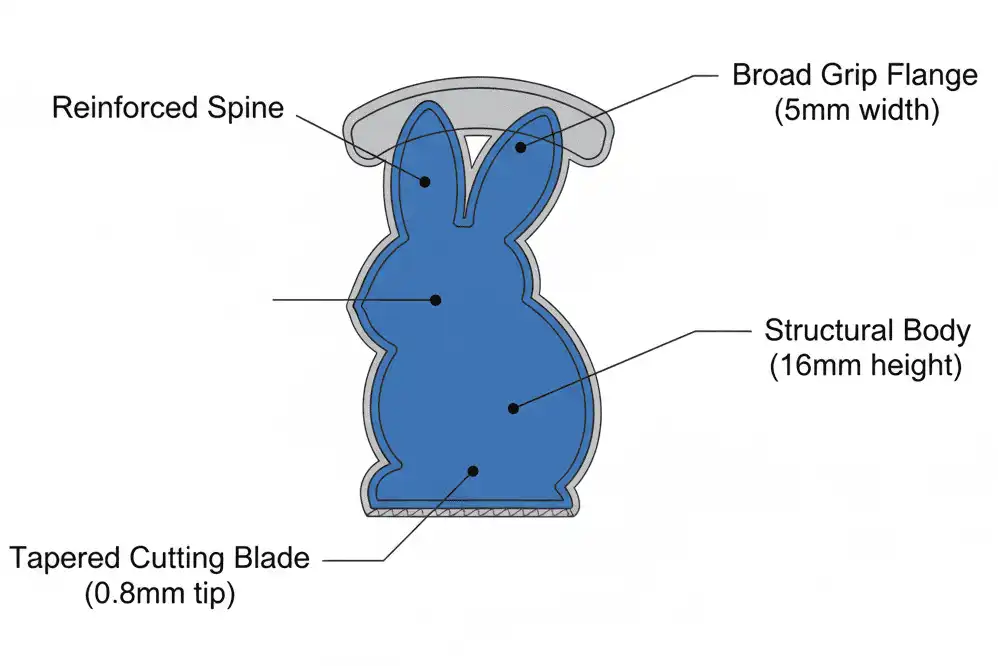
Introduction: Why Custom 3D Printed Cutters Transform Seasonal Baking
Easter baking presents unique geometric challenges. Detailed shapes like long bunny ears, cracked egg edges, and miniature chick feet often tear or distort in commercial tin and injection-molded cutters.
Using a dedicated Easter cookie cutter STL file gives bakers and makers complete control over dimensions, cutting taper, and embossing depth. Whether you run an Etsy cookie business, print holiday gifts with your children, or prepare treats for a spring festival, 3D printing delivers custom profiles on demand.
This technical guide covers digital mesh inspection, slicer parameter optimization, food safety protocols, and dough handling techniques. Following these standards ensures your seasonal prints produce clean cuts without compromising kitchen hygiene.
Anatomy and Architecture of an Easter Cookie Cutter STL File
High-performance cookie cutters are engineered mechanical profiles rather than simple wall extrusions. A poorly designed 3D model bends under pressure, tears chilled sugar cookie dough, or traps dough inside narrow cavities.
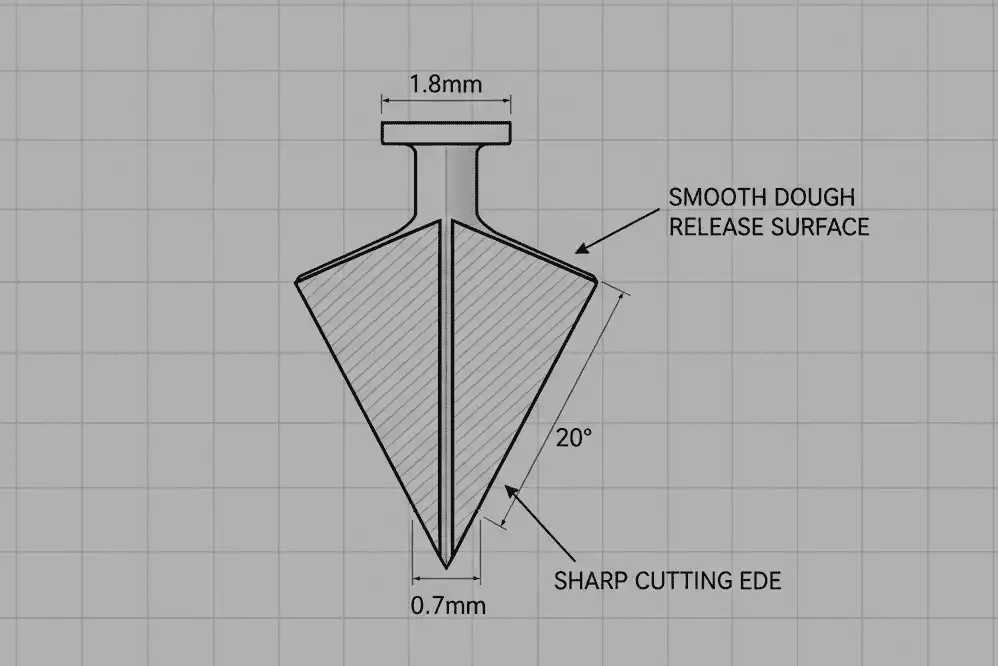
The Cutting Edge (Blade)
The cutting rim must be sharp enough to slice dough cleanly without requiring excessive downward force. A flat 1.2mm top surface crushes dough instead of cutting it, destroying edge definition.
A well-modeled STL utilizes a tapered cutting edge. The contact tip measures roughly 0.6mm to 0.8mm across, gradually widening to a sturdy 1.2mm or 1.6mm spine. This structural taper slices dough effortlessly while supporting lateral pressure.
The Support Wall (Body Height)
Standard rolled sugar cookie dough sits between 6mm and 8mm thick (1/4 inch to 5/16 inch). If your cutter wall is too shallow, the handle flange compresses the dough surface before the blade reaches the baking mat.
The vertical wall height of an Easter cutter model should range between 14mm and 18mm. This height clears the dough slab comfortably while maintaining rigid vertical alignment during the cut.
The Grip Flange (Handling Lip)
The top boundary of the cutter requires a horizontal brim or rolled lip measuring 4mm to 6mm wide. This flange distributes palm pressure evenly across the perimeter.
Attempting to cut stiff, chilled dough with an un-lipped vertical wall is uncomfortable and risks cracking the print along layer lines. A broad upper lip stabilizes the perimeter and prevents structural flexing.
Embossing Stamps and Depth Offset
Two-piece Easter cutters feature an outer outline cutter paired with an interior stamping plate for details like bunny whiskers or egg patterns. The embossing details must be inset 3mm to 4mm below the main cutting blade.
If the stamp and blade are aligned on the same horizontal plane, the stamp cuts entirely through the dough rather than embossing a surface pattern. Ensure your STL file accounts for this vertical offset.
Popular Easter Geometries and Structural Considerations
Seasonal Easter designs introduce distinct structural stress points that require attention during model selection and slicing.

Bunny Silhouettes and Ear Flexure
Long, narrow features such as rabbit ears present high mechanical leverage points. When cutting stiff dough, thin ears flex outward, creating uneven cuts or snapping at the base.
Choose STL files with a stabilizing bridge connecting the ears or models where ear walls widen slightly at the skull base. Increase the wall perimeter count in your slicer to reinforce these narrow projections.
Egg Outlines and Nested Cutters
Egg silhouettes are mechanically robust because continuous elliptical shapes distribute downward force uniformly. These files are ideal for nesting sets, where multiple sizes fit inside one another to conserve storage.
When printing nested egg STLs, leave at least 1.5mm of radial clearance between rings. This clearance accounts for minor filament shrinkage and prevents the nested cutters from wedging together.
Intricate Chicks, Florals, and Spring Lambs
Complex models featuring tight internal radii below 2mm tend to pack with dough during repetitive stamping. Dough warmth softens butter, causing it to grip within tiny crevices.
Select open, flowing designs whenever possible. If using detailed floral or feathered edges, pair the cutter with a separate mechanical push plate (ejector) to release sticky dough cleanly.
Food Contact Safety: Filaments, Nozzles, and Micro-Crevices
Printing objects that touch food requires strict attention to material composition, machine components, and bacterial risks. Standard 3D printing practices are not automatically food-safe.
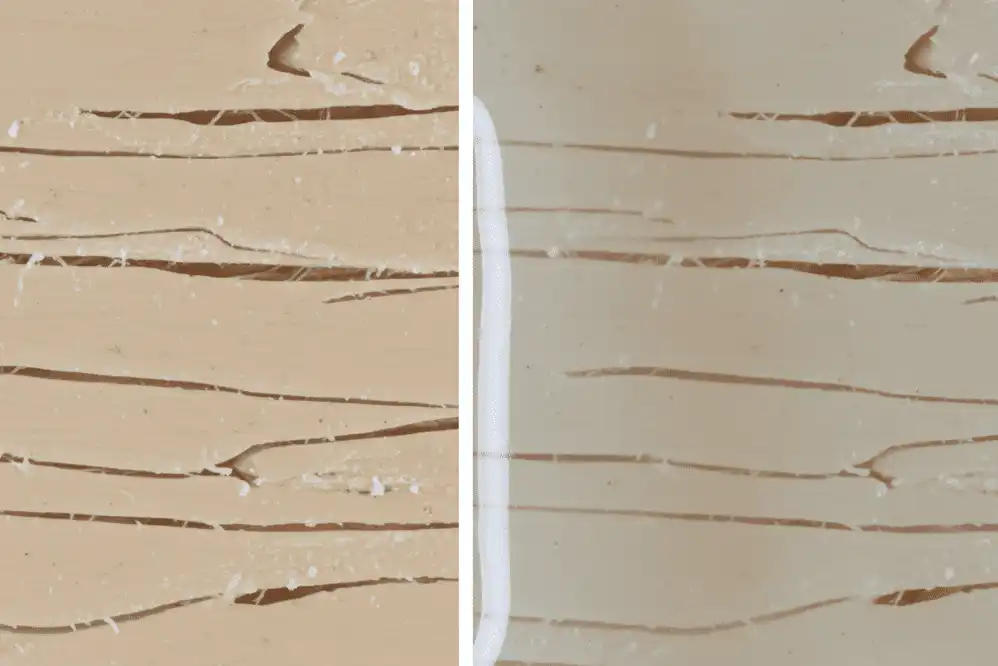
The Risk of FDM Layer Lines
Fused Deposition Modeling (FDM) builds parts layer by layer, creating microscopic grooves across the entire vertical surface. These valleys harbor butter, flour, and raw egg proteins.
Standard sink washing cannot reliably reach into sub-millimeter crevices, allowing bacteria such as Salmonella and E. coli to propagate. For commercial use or repeated home baking, post-process the printed cutter with a certified food-contact barrier or use a thin plastic wrap barrier during cutting.
Brass Nozzles vs. Stainless Steel Nozzles
Standard desktop 3D printers ship with brass nozzles. Free-machining brass alloys frequently contain trace quantities of lead (often 0.5% to 2%) added to improve machinability.
During extrusion, abrasive filaments can leach microscopic lead particles into the melted plastic. Always swap your stock brass nozzle for an untreated 303 or 316 stainless steel nozzle before manufacturing food-contact items.
Filament Additives and Colorants
Base polylactic acid (PLA) resin is derived from renewable starches and is non-toxic. However, commercial spool manufacturers blend raw resin with masterbatch pigments, flow enhancers, and impact modifiers.
These industrial additives are rarely certified for food contact. Purchase filaments explicitly certified under FDA (Food and Drug Administration) or EU food contact regulations, or select natural, unpigmented PLA with no added dyes.
Material Selection: PLA vs. PETG vs. Resin for Kitchen Tools
Choosing the correct polymer dictates whether your cookie cutter survives baking prep or deforms after its first use.
Polylactic Acid (PLA)
PLA is the industry standard for 3D printed cookie cutters. It prints at low temperatures with minimal warping, holds sharp geometric edges, and exhibits excellent stiffness.
The primary drawback of PLA is thermal sensitivity. With a glass transition temperature ($T_g$) around 55°C to 60°C, PLA parts deform immediately in hot water or home dishwashers.
Polyethylene Terephthalate Glycol (PETG)
PETG provides greater chemical resistance and higher heat tolerance ($T_g$ roughly 80°C) than PLA. It handles warm sanitizing washes without losing shape.
However, PETG is prone to stringing and surface oozing on rapid retractions. These micro-strings create loose plastic hairs that must be meticulously cleaned from cutting blades before kitchen use.
Why Photopolymer Resin Is Prohibited for Food Use
Liquid resin printing produces exceptional surface detail, tempting many to print intricate Easter egg stamps on MSLA or SLA machines. However, standard photopolymer resin is toxic and unsafe for direct food contact.
Cured resin parts continue to leach toxic photoinitiators, monomers, and chemical compounds over time. Microscopic edge wear can chip brittle resin shards directly into raw dough. Restrict cookie cutter printing exclusively to certified FDM thermoplastics.
Step-by-Step Guide: Slicing and Printing Your STL Files
Achieving a durable, food-ready cutter requires targeted slicing parameters rather than stock printing profiles.

Step 1: Mesh Inspection and Build Plate Orientation
What: Import the STL into your slicer (such as PrusaSlicer, Bambu Studio, or Cura) and position the flat grip flange directly onto the print bed.
Why: Printing with the cutting blade pointing upward preserves maximum sharpness on the top edge. It also avoids messy support structures on the functional cutting rim.
How: Use the “Lay Flat” or “Face to Bed” tool to align the widest flat surface with your build plate. Verify that no segments of the cutting edge hover unsupported in mid-air.
Common Mistake: Inverting the cutter so the sharp blade sits against the build plate. This crushes the sharp edge into bed-level elephant’s foot distortion.
Pro Tip: Check the 3D model for non-manifold edges or inverted normals. Repair internal mesh defects using the slicer’s built-in repair utility to prevent missing wall segments.
Step 2: Perimeter and Wall Thickness Configuration
What: Set your wall line count to 3 or 4 perimeters, achieving an absolute shell thickness of at least 1.2mm to 1.6mm.
Why: Cookie cutter bodies are thin. If your wall count is set to 2, the slicer leaves a hollow pocket between inner and outer shells that traps stagnant wash water.
How: In your slicer settings, increase “Perimeters” (or “Wall Loops”) to 4. For standard 1.2mm cutter wall files, this generates a 100% solid perimeter with zero internal air pockets.
Common Mistake: Relying on standard 20% grid infill. Water penetrates through pinhole gaps during washing, breeding mildew within the enclosed hollow walls.
Pro Tip: Enable “Detect Thin Walls” or set the slicer’s wall generator to “Arachne” to ensure ultra-thin blade tips are fully sliced without broken toolpaths.
Step 3: Layer Height and Print Speed
What: Select a layer height between 0.15mm and 0.20mm and reduce outer wall speed to 30–45 mm/s.
Why: Thinner layer lines reduce the depth of surface grooves, making the cutter easier to clean and releasing dough more smoothly. Lower speeds improve dimensional accuracy along tight curves.
How: Adjust primary layer resolution to 0.16mm. Set the outer wall speed ceiling lower than your standard rapid draft profiles.
Common Mistake: Printing at a coarse 0.30mm layer height to save 15 minutes. Heavy layer ridges create mechanical drag that causes moist dough to cling and tear.
Pro Tip: Enable the “Ironing” feature on the topmost layer if printing flat two-piece Easter stamps to generate a smooth, polished face plate.
Step 4: Seam Alignment and Temperature Management
What: Configure the Z-seam to “Rear” or “Aligned” and set your nozzle temperature to the lower end of the filament’s operational window.
Why: Random Z-seams create small bumps (zits) around the cutting perimeter. These bumps score the dough edge and collect flour paste. Lower temperatures minimize fine stringing.
How: Select “Aligned” or “Corner” Z-seam placement in your slicer. Print temperature test towers to determine the cleanest extrusion temperature for your spool.
Common Mistake: Printing too hot, causing filament droop on unsupported internal overhangs like bunny ear arches.
Pro Tip: Set cooling fans to 100% after the second layer to lock the extruded profile instantly into position, preserving crisp cutter corners.
Slicer Configurations and Material Properties Comparison
Use this reference table to configure your slicing profiles based on nozzle diameter and intended baking volume.
| Parameter / Spec | 0.4mm Nozzle (Standard) | 0.6mm Nozzle (High Production) | Food-Grade PETG Profile |
|---|---|---|---|
| Recommended Material | Virgin Food-Grade PLA | Virgin Food-Grade PLA | Certified Food-Safe PETG |
| Layer Height | 0.16mm (Smooth surface) | 0.20mm (Rapid output) | 0.16mm (Minimizes stringing) |
| Perimeter (Wall) Loops | 3 to 4 loops | 2 to 3 loops | 3 to 4 loops |
| Infill Density | 100% (Solid structure) | 100% (Solid structure) | 100% (Solid structure) |
| Cutting Edge Sharpness | High (0.45mm tip width) | Moderate (0.65mm tip width) | Moderate to High |
| Max Wash Temperature | 40°C / 104°F (Lukewarm) | 40°C / 104°F (Lukewarm) | 65°C / 149°F (Warm wash) |
Professional Tips for Commercial Sellers and High-Volume Bakers
Running an Etsy cutter store or producing hundreds of Easter cookies on a commercial deadline requires refined processes.
Batch Printing Layouts and Clearances
When arranging multiple Easter cookie cutter STL files across your build plate, maintain at least 15mm of clearance between parts. Crowding parts increases travel moves, heightening the risk of stringing between clean cutting edges.
Enable “Sequential Printing” (“Complete Individual Objects” mode) if your machine clearance allows. This prints each cutter start-to-finish independently, preventing an error on one part from ruining an entire batch.
Flour Dusting and Chilled Dough Mechanics
Even the sharpest 3D printed edge struggles against room-temperature butter dough. Instruct your customers or kitchen staff to chill rolled dough sheets at 4°C (39°F) for 30 minutes before cutting.
Dust the 3D printed cutter in a shallow dish of flour or cornstarch prior to every cut. The powder forms a microscopic release barrier across the plastic layer lines, allowing clean separation on complex shapes like bunny whiskers.
Plastic Wrap Barrier Technique
For high-turnaround home baking, place a sheet of ultra-thin commercial plastic wrap (cling film) over the rolled dough before cutting. Press the 3D cutter directly through the film into the dough.
This barrier prevents any raw food from contacting the printed polymer. It eliminates bacterial contamination in the layer lines and rounds the upper cookie edges slightly, creating a smooth surface for royal icing.
Common Mistakes and Troubleshooting Fixes
Avoid these common pitfalls when sourcing, slicing, and handling 3D printed seasonal tools.

Issue 1: Snapping Bunny Ears During Dough Extraction
Cause: The cutter’s ear cavities are too narrow, creating suction that pulls delicate dough apart when lifting the tool.
Solution: Choose STL files with draft angles (angled walls that widen toward the handle). When stamping, gently tap the back of the dough or use an integrated stamp pusher to eject the shape evenly.
Issue 2: Warped Cutters After Cleaning
Cause: Placing PLA cutters inside a standard household dishwasher or soaking them in scalding water.
Solution: Wash exclusively by hand using water under 40°C (104°F). Emphasize hand-wash warnings clearly on care cards if you sell 3D printed cutters to consumers.
Issue 3: Stringing Fibers Deposited on the Cutting Rim
Cause: Inadequate slicer retraction settings or damp, moisture-saturated filament.
Solution: Dry your filament in a dedicated dehydrator for 4 to 6 hours before printing. Increase your retraction distance by 0.5mm increments and enable “Wipe While Retracting”.
Issue 4: Hollow Wall Structural Collapse
Cause: Slicing with default low infill percentages, leaving cutter walls structurally unsupported under heavy hand pressure.
Solution: Set your wall perimeter count high enough to make the cutter body completely solid. A solid plastic shell prevents buckling under firm palm pressure.
Sanitizing, Storage, and Maintenance Best Practices
Proper sanitation ensures your seasonal tools remain safe and ready for future baking sessions.
Safe Sanitizing Protocol
Immediately after baking, soak cutters in lukewarm soapy water for no more than 5 minutes to soften any dried starch. Clean all crevices using a soft-bristled nylon brush rather than abrasive scouring pads that scratch the polymer.
Rinse thoroughly in cool running water. Shake vigorously to eject trapped moisture droplets, then place the cutters upside down on a clean lint-free towel to dry fully.
Applying Food-Grade Sealants
To eliminate bacterial risks in layer lines permanently, apply an FDA-compliant food-contact epoxy resin or food-grade polyurethane coating. Dip the finished print or brush it evenly across all surfaces.
The clear sealant fills layer lines, producing an ultra-smooth, non-porous finish. This protective shell resists bacterial growth and allows thorough sanitation between uses.
Seasonal Storage
Store your Easter cutters in a cool, dry area away from direct sunlight. Ultraviolet light degrades PLA polymers over time, making them brittle.
Avoid stacking heavy kitchen items on top of thin cutters. Store them flat inside rigid plastic storage bins to prevent delicate ear and floral details from bending during the off-season.
Recommended Tools and Design Software
These proven digital tools help you find, customize, or generate custom Easter cookie cutter STL files.
- CookieCAD: A specialized web application that converts flat 2D silhouette images (PNG/SVG) into ready-to-print cookie cutter STLs with custom blade heights and flanges.
- Fusion 360: Ideal for precision CAD modeling. Use the Sweep and Offset tools to create custom profiles, bevels, and two-piece stamping mechanisms.
- Tinkercad: A beginner-friendly browser tool suitable for combining basic shapes, scaling egg designs, and creating custom text stamps.
- PrusaSlicer / Bambu Studio / Cura: Core slicing software featuring the Arachne engine for generating variable-width wall lines along narrow cutter tips.
Related Topics and Suggested Reading
Expand your knowledge of digital fabrication and seasonal baking with these related guides:
- Complete Guide to Food-Safe 3D Printing: Resins, Coatings, and Certifications
- How to Convert 2D Vector Drawings into 3D Printable STL Files
- Optimizing Slicer Retraction Settings to Eliminate Fine Stringing
- Best Filaments for Functional Kitchen Tools: PLA vs. PETG vs. Polypropylene
- Commercial 3D Printing for Etsy Sellers: Batch Production and Quality Control
- Chilled Sugar Cookie Dough Recipes Designed for Intricate 3D Cutters
Authoritative References and Safety Standards
Consult these official standards and technical guidelines regarding food contact polymers:
- U.S. Food and Drug Administration (FDA): Code of Federal Regulations Title 21 (CFR 21) – Specific guidelines covering polymers, colorants, and coatings intended for repeated food contact.
- Prusa Research Materials Guide: Comprehensive testing data on the hygiene, bacterial retention, and sanitization limits of FDM printed components.
- European Food Safety Authority (EFSA): Regulatory criteria regarding plastic materials and articles intended to come into contact with foodstuff.
Key Takeaways
- Select STL models featuring tapered cutting edges (0.6mm–0.8mm) and a wide top lip (4mm–6mm) to protect your hands and cut cleanly.
- Always replace standard brass nozzles with food-grade stainless steel to prevent trace lead contamination during extrusion.
- Set your slicer to 4 perimeters and 100% infill to avoid hollow internal cavities that trap stagnant wash water.
- Use virgin, unpigmented PLA for easy printing, or coat finished cutters in food-safe epoxy to seal microscopic layer lines.
- Never place PLA prints in a dishwasher; wash them exclusively by hand using lukewarm water and mild antibacterial soap.
Final Recommendations
3D printing custom Easter cookie cutters bridges digital manufacturing and artisan baking. Sourcing high-quality STL files with proper tapers and applying targeted slicing settings yields clean, bakery-grade cuts year after year.
Start by testing your machine’s calibration on a basic egg model before moving on to delicate bunny ears or multi-piece floral stamps. With the right materials, nozzle setup, and dough preparation, your custom Easter prints will perform reliably all season long.
Frequently Asked Questions (FAQ)
Is it safe to use a 3D printed cookie cutter for food?
3D printed cutters are safe for limited use if printed with virgin food-grade PLA and a clean stainless steel nozzle. Because FDM layer lines harbor bacteria, you should seal the cutter with an FDA-compliant food-grade coating, wash it carefully in lukewarm water, or place plastic wrap over dough before cutting.
Why do my Easter cookie cutters melt or warp in the dishwasher?
Standard PLA filament has a low glass transition temperature of 55°C to 60°C (131°F to 140°F). Commercial and domestic dishwashers reach wash temperatures well above this threshold, causing the plastic to soften, warp, and lose shape. Always wash PLA cookie cutters by hand using lukewarm soapy water.
What are the ideal slicer settings for an Easter cookie cutter STL?
Configure your slicer for a 0.16mm layer height and 3 to 4 perimeters (wall loops). This creates a solid 1.2mm to 1.6mm wall without internal hollows that trap water. Keep infill at 100%, lower outer wall speed to 35 mm/s, and set the Z-seam to aligned.
Can I use resin (SLA) printing for cookie cutters?
No, photopolymer resin is toxic and unsafe for kitchen tools. Standard UV resins contain hazardous chemical photoinitiators that can leach into raw dough. Cured resin is also brittle, creating a risk that small plastic shards snap off into food. Stick strictly to food-grade FDM filaments like PLA.
How do I prevent cookie dough from sticking inside detailed bunny cutters?
Chill your rolled sugar cookie dough thoroughly at 4°C (39°F) for 30 minutes before cutting. Dip the cutter into flour or cornstarch prior to each cut. The flour coats the layer lines, breaking surface suction and allowing delicate sections like bunny ears to release cleanly.
What nozzle should I use when printing cookie cutters?
Use a 0.4mm stainless steel nozzle. Standard brass nozzles contain trace quantities of lead added during industrial manufacturing, which can contaminate extruded plastic. Stainless steel nozzles are chemically inert, lead-free, and approved for food-contact tool production.
How thick should the cutting blade be on a cookie cutter STL?
The cutting edge should taper to a width between 0.6mm and 0.8mm at the tip. This profile is sharp enough to cut through chilled dough without tearing, while remaining durable enough to resist cracking under normal hand pressure.
What is the difference between a cutter and a stamp STL file?
A cutter STL file features a tall outer blade (14mm to 18mm high) designed to slice completely through dough. A stamp STL file is a shorter, solid plate (4mm to 8mm high) featuring raised surface patterns that emboss decorative details into the dough without cutting the perimeter.